

Local PC security review for solo founders and owner-operators working with AI
If your PC is at the center of your AI work, start by reviewing that machine.
TF-Aegis is a menu bar security review agent for the local PC you actually use to work with AI. It surfaces the recurring issues solo founders and owner-operators run into: tangled system settings, local AI ports exposed beyond localhost, loose Claude/Codex policies, plaintext API keys, and suspicious auto-run items.
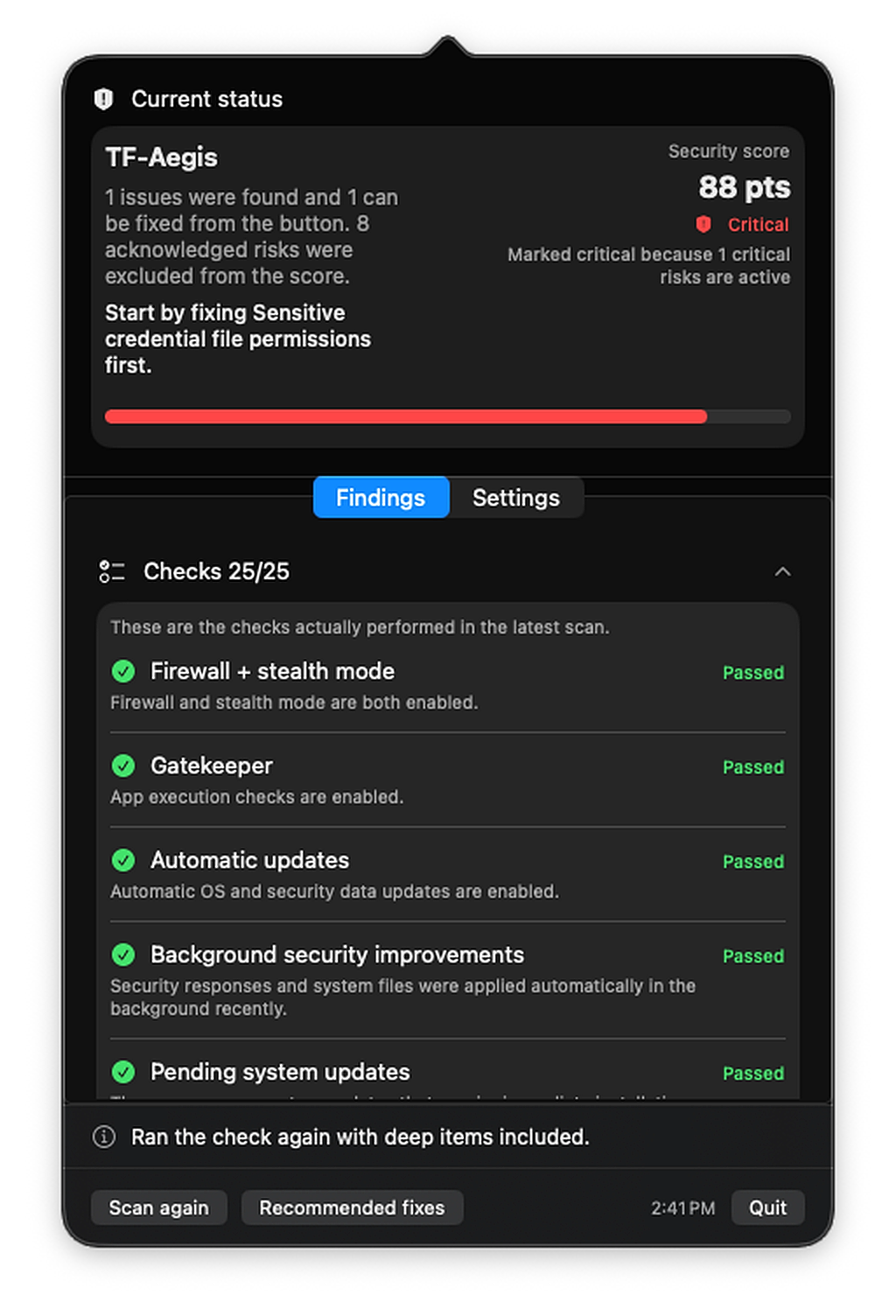
Built around the tools you actually use
It reviews the real operating environment of the local PC you use for AI work.
Instead of repeating generic enterprise security language, TF-Aegis focuses on one local PC: the machine solo founders and owner-operators actually use to run the business. That means agent tools, local models, API keys, and business files all living in one place.
Review coverage
Every check is concrete enough to understand quickly and specific enough to act on.
A security review becomes useful when it turns vague risk into concrete items you can understand and act on. TF-Aegis follows that principle, but reshapes the review around the real day-to-day setup of solo builders using Claude, Codex, and local AI workflows.
Core macOS hardening
It starts with the baseline security settings that are easy to leave half-configured.
- ·Firewall and stealth mode
- ·Gatekeeper and automatic update status
- ·Automatic login, guest access, and lock screen settings
- ·FileVault, SIP, remote login, and sharing services
Local AI exposure
A modern AI work machine often runs model servers and local web UIs at the same time, which expands the attack surface faster than most people realize.
- ·Port exposure across Ollama, LM Studio, Open WebUI, ComfyUI, and vLLM-style tools
- ·Bindings exposed beyond localhost
- ·High-risk macOS permissions granted to AI tools and helper apps
Claude / Codex policies
Agent tools need review too. Approval rules and sandbox settings drift more easily than most people expect.
- ·Risk points around Claude Code overrides, hooks, and MCP connections
- ·Codex CLI approval policy, sandbox settings, and trusted scopes
- ·Local config that quietly weakens expected safety boundaries
Secrets and auto-run items
It reviews the shortcuts that created the exposure in the first place, and the items that keep it around afterward.
- ·Plaintext keys left in shell profiles, project env files, and tool configs
- ·Permissions on SSH, AWS, Docker, GitHub, Claude, and Codex credential files
- ·LaunchAgents, LaunchDaemons, orphaned entries, and AI helpers that keep reappearing
How it responds
It does not stop at finding the issue. It helps you decide what to do next.
Fix the obvious right away
When the safe path is clear, TF-Aegis can tighten supported settings and file permissions directly.
Jump straight to the right setting screen
For items like FileVault or pending OS updates, it takes you to the exact place you need immediately.
Explain what still needs human judgment
Local model servers, launch items, hooks, and high-risk permissions are explained with enough context for you to decide.
Plans
Start with the essentials, then go deeper as your setup gets more complex.
TF-Aegis is not an MDM console or an antivirus product. It is built to keep one business-critical local PC under regular review.
Free
- Firewall, stealth mode, Gatekeeper, and automatic updates
- Lock screen, guest access, remote login, sharing, FileVault, and SIP
- Scan on launch, on-demand recheck, and a widget-ready summary
Pro
- Local AI port exposure and high-risk permissions
- Claude Code and Codex policy review
- Plaintext keys, credential-file permissions, and deep review of auto-run items
While the app stays open, Pro can re-check access status and run scheduled rescans. The review itself is still computed locally.
Local-first
A security review should not turn into someone else’s telemetry stream.
TF-Aegis evaluates findings on-device and stores only the minimum local summary needed for widgets and updates.
TF-Aegis is not an antivirus engine, a real-time intrusion detector, or a multi-device admin console.
- Security findings stay local instead of being uploaded to a separate analysis backend.
- External network calls are limited to sign-in, access checks, purchase flows, and update checks.
- The widget stores only the score and next action summary, not raw file contents or full logs.